To crack UI developer interview questions in 2026, you need strong HTML, CSS, and JavaScript fundamentals. You must be confident with a modern framework like React and comfortable building responsive, accessible components in live coding rounds. That is exactly what most companies test today.
The demand is real. The U.S. Bureau of Labor Statistics1 projects continued growth for web developers and digital designers through 2034, faster than the average for most occupations. Additionally, recent US-based UX job satisfaction research published2 shows sustained demand and a strong career outlook in interface-focused roles.
In this article, we’ll break down the most important UI developer interview questions, explain what interviewers actually evaluate, and share key strategies that help you move from building small widgets to earning real offers.
Key Takeaways
- Start with fundamentals. Master HTML, CSS, and JavaScript to answer core UI developer interview questions.
- Ship small production-grade widgets. Practical builds beat theory for UI developer interview questions.
- Show system thinking. Explain state shape and API design when asked UI developer interview questions about architecture.
- Prioritize accessibility and performance. These are high signal areas in UI developer interview question rounds.
- Narrate trade-offs and tests. Demonstrate defensive coding and observability when answering UI developer interview questions.
What Does a Typical UI Developer Interview Process Look Like?
To master the UI developer interview questions that stand between you and a signed offer, you must first understand the process you’re about to go through. In 2026, companies evaluate how your UI components scale, how accessible your interfaces are, and how you navigate the bridge between design and engineering.
The Standard UI Developer Interview Pipeline
While every company has its own flavor, most top-tier tech firms follow a structured four-to-five-stage process. Understanding the vibe of each round is half the battle when preparing for interview questions and answers for UI developer roles.
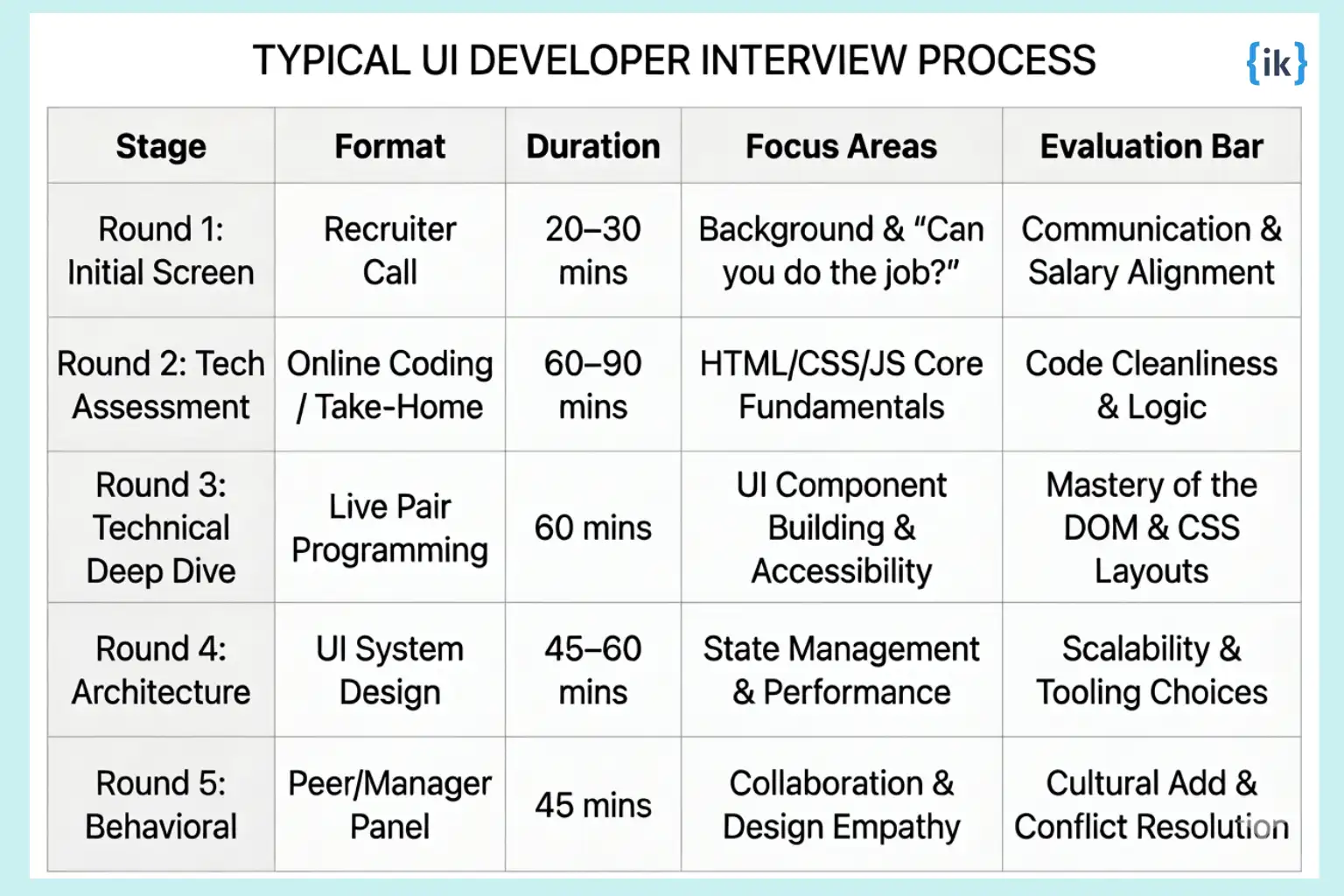
Phase 1: The Filter (Rounds 1 & 2)
The early stages are designed to weed out candidates who lack the fundamental building blocks. Expect UI developer interview questions that lean heavily on trivia and gut-check coding.
- Recruiter Screen: This is rarely technical. The recruiter wants to ensure you don’t just use libraries but actually understand the platform.
- The Technical Screen: Usually involves a platform like CoderPad. You might be asked to implement a utility function or fix a broken CSS layout.
Phase 2: The Core Evaluation (Rounds 3 & 4)
This is where the high-value interview questions for UI developers appear. You aren’t just coding; you’re architecting the user experience.
- Live UI Coding: You will likely be asked to build a real-world component. Think of an Image Carousel, a Star Rating widget, or a Typeahead search. Interviewers are watching for:
- Semantic HTML: Are you using <button> or just <div> with a click handler?
- A11y (Accessibility): Are you managing focus and ARIA labels?
- CSS Mastery: Can you center a div without Googling it?
Phase 3: The Confirmation (Round 5)
By the time you reach the Hiring Manager or the behavioral panel, the team likely knows you can code. Now, they are testing your Design Empathy.
Also Read: Meta Front End Engineer HTML CSS Interview Questions You Should Know in 2026
What are the Interview Domains Evaluated for a UI Developer in 2026?
Effective preparation for UI developer interview questions requires shifting focus from the chronological order of rounds to the specific technical signals being evaluated. Top-tier engineering firms prioritize candidates who demonstrate mastery across distinct functional domains rather than those who simply follow a framework’s documentation.
By categorizing your preparation into these pillars, you ensure that your interview questions and answers for UI developer roles reflect the depth required for a modern engineering environment.
Comprehensive Interview Domains for UI Developers
The following matrix serves as a high-level mental model for the evaluation criteria used by hiring committees. These domains represent the core competencies required to succeed in high-scale frontend environments.
| Domain |
Subdomains |
Primary Evaluation |
Technical Depth |
| JavaScript Internals |
Event Loop, Closures, Prototypes, Memory |
Technical Screen |
High |
| Visual Construction |
CSS Grid, Flexbox, Specificity, Rendering |
Live Coding |
High |
| System Architecture |
State Management, Modularization, CI/CD |
System Design |
Medium–High |
| Digital Accessibility |
WCAG 2.1, ARIA, Focus Management |
All Technical Rounds |
High |
| Behavioral Alignment |
Cross-functional Collaboration, Feedback |
Leadership Round |
High |
| Product & UX Logic |
User Flows, Performance Budgeting |
Design Loop |
Medium |
Interview Questions for UI Developer Across Core Domains
To get a senior-level offer in 2026, you have to prove you aren’t just a component coder. You need to show you can handle the messy reality of production: slow networks, broken APIs, and designers who change their minds every two days.
The following domains break down the specific technical hurdles you’ll face, categorized by what the interviewers are actually grading you on.
Domain 1: UI Engineering & Core JavaScript Fundamentals
This domain is the bedrock of any technical evaluation. It is where you prove that you aren’t just a user of frameworks like React or Vue, but an engineer who understands the web’s execution environment.
What Are Interviewers Evaluating?
In this domain, interviewers focus on:
- They want to see if you understand the why behind JavaScript’s quirks rather than just memorizing syntax.
- For senior roles, you are expected to explain memory management and the mechanics of the event loop.
- Can you articulate when to use a specific design pattern versus another based on performance constraints?
- How you handle follow-up questions that push the boundaries of your initial solution.
Common UI Developer Interview Questions
Q1. Explain the difference between throttle and debounce, and provide a real-world implementation scenario for each.
Both are techniques used to limit the number of times a function executes, but they serve different purposes.
- Debouncing ensures that a function is only called after a certain amount of time has passed since the last time it was invoked. This is ideal for search input fields where you don’t want to hit an API on every single keystroke.
- Throttling guarantees that a function is called at most once in a specified time interval. This is best for scroll events or window resizing, where you need consistent updates without overloading the main thread.
Q2. What is the Event Loop, and how does it handle microtasks vs. macrotasks?
The Event Loop is the secret sauce that allows JavaScript to be non-blocking despite being single-threaded. It constantly checks the call stack and the task queues.
- Macrotasks include things like setTimeout, setInterval, and I/O operations.
- Microtasks include Promises and MutationObserver. The critical detail is that the loop will execute all pending microtasks before moving on to the next macrotask.
If a microtask schedules more microtasks, they will also be run before the UI renders or the next macrotask starts.
Q3. Describe hoisting in JavaScript and how let and const changed its behavior compared to var.
Hoisting is the browser’s behavior of moving declarations to the top of the current scope during the compilation phase. While var declarations are hoisted and initialized as undefined, let and const are hoisted but remain uninitialized in a Temporal Dead Zone (TDZ).
Q4. How does the ‘this’ keyword work in different contexts?
In a regular function, the value of this is determined by how the function is called, through dynamic scoping. In an arrow function, this is lexically scoped, meaning it inherits this from the enclosing execution context.
Practice Questions:
- What is a Closure and can you provide a practical example of data encapsulation using one?
- Explain the difference between Prototype-based inheritance and Class-based inheritance.
- How do you prevent memory leaks in a single-page application?
- What are the differences between call(), apply(), and bind()?
- Explain the concept of Strict Mode in JavaScript.
- How does the async/await syntax work under the hood with Generators?
How to Approach These Questions?
When tackling UI developer interview questions in the core engineering domain, avoid giving one-word answers. Use the STAR method even for technical explanations. For instance, if asked about performance, don’t just say you optimized code. Explain the specific bottleneck, the tool you used to identify it, like Chrome DevTools, and the resulting change in load time.
Domain 2: Visual Construction & Layout Mastery (CSS)
This is where your ability to build professional interfaces is tested. It isn’t just about making things look good; it’s about making them robust and performant across a thousand different screen sizes.
What Are Interviewers Evaluating?
In this domain, interviewers focus on:
- Precision: Your ability to translate a design into code without losing the details.
- Scalability: Whether your CSS architecture will collapse the moment a second developer touches it.
- Performance: Understanding how CSS triggers layout shifts and repaints.
- Accessibility: Building interfaces that are usable by everyone.
Common UI Developer Interview Questions
Q5. Explain the CSS Box Model and how box-sizing: border-box impacts it.
The standard box model calculates the width of an element by adding width + padding + border. This often leads to elements overflowing their containers. By using box-sizing: border-box, you tell the browser to include the padding and border within the specified width, making layouts significantly more predictable and easier to manage.
Q6. When should you use CSS Grid versus Flexbox?
Flexbox is primarily for one-dimensional layouts. It’s great for alignment and distributing space within a container. CSS Grid is for two-dimensional layouts. Use Flexbox for small-scale components like navigation bars; use Grid for the overall page layout or complex gallery structures.
Q7. What is CSS Specificity, and how do you calculate it?
Specificity determines which CSS rule is applied by the browser when multiple rules target the same element. It is calculated based on a weight system:
- Inline styles (1,0,0,0)
- IDs (0,1,0,0)
- Classes, attributes, and pseudo-classes (0,0,1,0)
- Elements and pseudo-elements (0,0,0,1) Universal selectors and inherited styles have no weight. Understanding this is crucial for avoiding important tag abuse.
Q8. Describe the concept of Critical CSS and its impact on performance.
Critical CSS is the technique of extracting and inlining the minimum amount of CSS required to render the above-the-fold content of a webpage. By delivering this CSS directly in the HTML <head>, you eliminate the render-blocking request for the external stylesheet, significantly improving the First Contentful Paint (FCP) metric.
More UI Developer Interview Questions to Practice:
- What are CSS Variables, and how do they differ from Sass variables?
- Explain the difference between display: none and visibility: hidden.
- How do you implement a Dark Mode toggle using only CSS and data attributes?
- What are Staged Transitions, and how do you optimize them for 60fps?
- How does the z-index property interact with Stacking Contexts?
- Explain the BEM (Block Element Modifier) methodology.
How to Approach These Questions?
For interview questions and answers for UI developer roles, the secret is to talk about The User. When explaining a layout choice, mention how it affects mobile users or those with slow connections.
💡 Pro Tip: If you are asked to code a layout live, narrate your thought process. Explain why you are choosing Flexbox over Grid for that specific widget. It shows you aren’t just memorizing snippets, you’re making intentional engineering decisions.
Domain 3: Frontend System Design & Architecture
This domain evaluates your ability to move from writing a component to designing a system. For senior and staff roles, this is often the decisive round that determines your level and total compensation.
What Interviewers Are Evaluating?
In this domain, interviewers focus on:
- Modularization: How you break down a massive, ambiguous requirement into smaller, manageable sub-systems.
- Data Flow & State: Your reasoning for choosing specific state management patterns and how data is synchronized across the app.
- Performance at Scale: Strategies for code-splitting, lazy loading, and managing a Performance Budget in a complex application.
- Resilience: How your architecture handles network failures, API latency, and Graceful Degradation.
Common Frontend System Design Interview Questions
Q9. How would you design a scalable architecture for a real-time collaborative tool like Google Docs or Figma?
A collaborative UI requires a robust synchronization strategy.
- Communication: Use WebSockets or Server-Sent Events (SSE) for persistent, low-latency updates.
- Conflict Resolution: Implement Operational Transformation (OT) or Conflict-free Replicated Data Types (CRDTs) to ensure that when two users edit the same line, the state remains consistent.
- Optimistic UI: To prevent laggy feelings, update the local UI immediately when a user types, then reconcile that change with the server in the background. If the server rejects the change, perform a rollback to the previous stable state.
Q10. Design an Image Carousel component library that will be used by hundreds of developers across different teams.
This isn’t just about the visual slider; it’s about the API and developer experience (DX).
- Component API: I would use a Compound Component pattern (e.g.,
<Carousel><Carousel.Item/></Carousel>) to give developers maximum flexibility over the internal layout.
- Theming: Utilize CSS Shadow Parts or CSS Variables so teams can easily brand the carousel without hacking the internal styles.
- Performance: Implement Lazy Loading for images that aren’t yet in the viewport and use content-visibility: auto to improve the rendering speed of long lists of items.
- Accessibility: Ensure keyboard navigation, ARIA live regions for slide changes, and a Pause button for any auto-playing elements.
Q11. How do you handle Micro-frontends, and when should a company avoid them?
Micro-frontends allow different teams to own different parts of a large application (e.g., Team A owns the Checkout and Team B owns the Search).
- Implementation: You can use Module Federation (via Vite or Webpack) to load remote bundles at runtime.
- The ‘When Not To’: Micro-frontends add massive complexity to the CI/CD pipeline and can lead to dependency hell or inconsistent UI. If a team is small, a Monolith or a Monorepo is almost always a better choice for maintaining velocity and visual consistency.
Q12. What is Hydration in the context of SSR/SSG, and how do Islands Architecture or Server Components improve it?
Hydration is the process by which client-side JavaScript takes over a static HTML page sent by the server to make it interactive. The problem is that the browser has to download and execute a massive JS bundle before the user can click anything.
- Islands Architecture (Astro): Only small islands of interactivity are hydrated, while the rest of the page remains static HTML.
- React Server Components (RSC): Allow you to render components on the server that never send any JavaScript to the client at all. This significantly reduces the Total Blocking Time (TBT) and improves the user experience on low-end devices.
Practice Questions:
- How would you design a News Feed that handles infinite scrolling with thousands of items?
- Explain your strategy for managing a Design System versioning across multiple repositories.
- How do you implement a robust caching layer using Service Workers (PWA)?
- Design an Autocomplete component that handles debouncing, keyboard navigation, and high-frequency API calls.
- How would you approach migrating a legacy jQuery application to a modern framework without stopping feature development?
How to Approach These Questions?
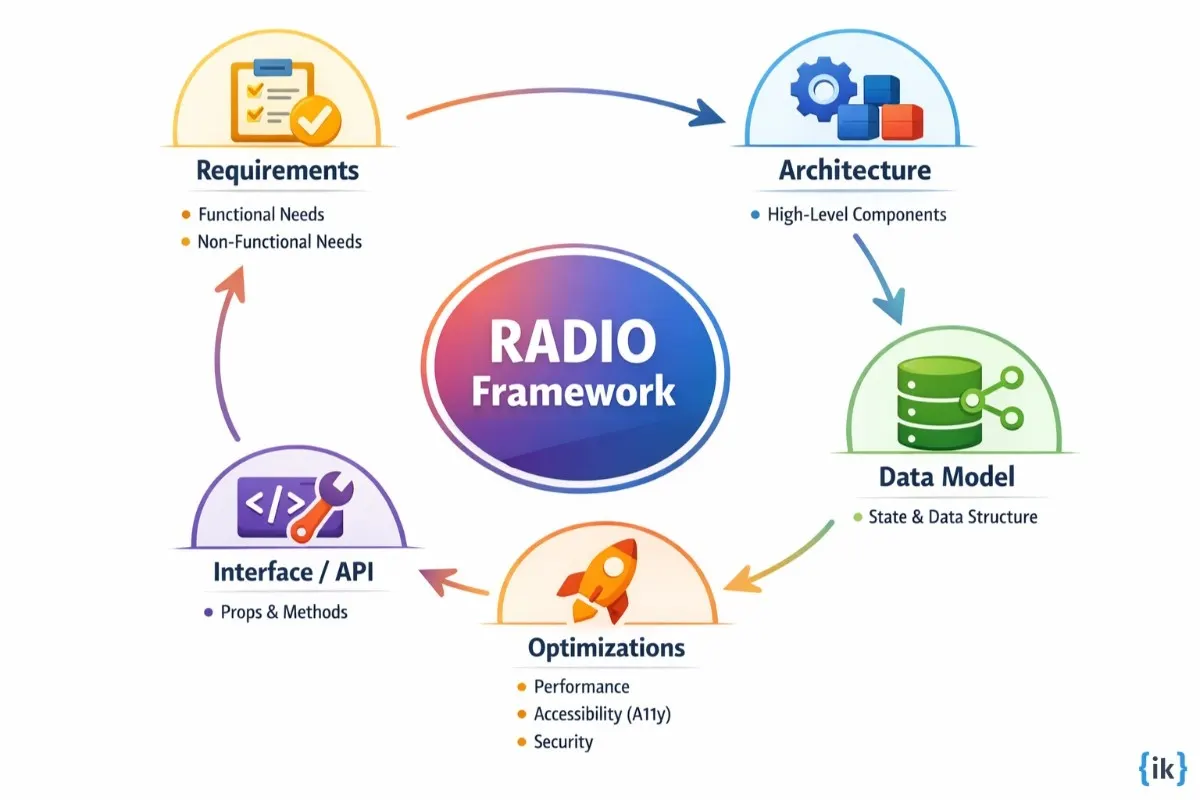
System design interview questions and answers for UI developer roles are not looking for a correct answer; they are looking for a justified answer.
- Clarify requirements: Never jump straight into the solution. Ask: “Is this for mobile or desktop?” or “What is the expected number of concurrent users?”
- Define the API first: Start by defining how other developers will interact with your system. Ask: “What props does it take? What events does it emit?”
💡 Pro Tip: If you spend 20 minutes talking about Redux middlewares without explaining why a global store is needed for this specific problem, you will lose the interviewer’s interest. Keep it architectural.
Domain 4: Digital Accessibility (A11y) & Web Standards
In the current hiring climate, accessibility is no longer a nice-to-have feature. It is a core engineering requirement. If you cannot build an interface that works for a user with a screen reader or someone who relies entirely on keyboard navigation, you are essentially shipping a broken product.
What Are Interviewers Evaluating?
In this domain, interviewers look for:
- Semantic Integrity: Whether you understand the functional difference between an interactive element and a structural one.
- Focus Management: Your ability to programmatically control the user’s place on the page during dynamic updates.
- WAI-ARIA Knowledge: Knowing when ARIA is necessary and, more importantly, when it is redundant or harmful.
- Inclusive Engineering: Your awareness of color contrast, touch targets, and motion preferences.
Common Interview Questions
Q13. You are building a custom Modal component from scratch. What are the essential accessibility requirements to make it compliant?
A truly accessible modal requires more than just a darkened background.
- Focus Trapping: When the modal opens, focus must move inside. The user should not be able to tab out into the background page until the modal is dismissed.
- Keyboard Support: The Escape key must trigger the close function.
- Roles and Labels: Use role=dialog and aria-modal=true. The container should have an aria-labelledby pointing to the modal title so screen readers announce the context immediately.
- Cleanup: When the modal closes, focus must be restored to the element that originally triggered it.
Q14. Explain the difference between aria-label, aria-labelledby, and aria-describedby.
These serve different purposes in the accessibility tree:
- aria-label: Provides a string as a label when no visible text exists.
- aria-labelledby: Points to the ID of another element that acts as the label. It is more robust than aria-label because it can associate multiple elements.
- aria-describedby: Provides a longer description, often used for hint text or error messages that supplement the primary label.
Q15. How do you handle ‘Live Regions’ for dynamic content like toast notifications or search results?
Since screen readers only read what is under the cursor or in focus, dynamic updates might be missed. We use aria-live to announce changes. aria-live=polite is the standard, allowing the screen reader to finish its current sentence before announcing the update. aria-live=assertive should only be used for critical errors that require immediate interruption.
Q16. What is the First Rule of ARIA, and why is it significant?
The first rule of ARIA is: “If you can use a native HTML element or attribute with the semantics and behavior you require already built-in, then do so.” For example, instead of using a <div> with role=button, just use a <button>. Native elements have built-in keyboard support and state management that you would otherwise have to manually re-create.
Practice Questions:
- How do you implement a Skip to Content link, and why is it necessary?
- What are the WCAG 2.1 color contrast requirements for normal vs. large text?
- How do you handle hidden content for screen readers vs. visual users?
- Describe how you would build a multi-level navigation menu that is keyboard accessible.
- What is the prefers-reduced-motion media query and how do you use it in animations?
- How do you make an SVG icon accessible to assistive technology?
How to Approach These Questions?
When answering interview questions and answers for UI developer roles in this domain, always advocate for the user. Don’t just talk about the code; talk about the experience. Mentioning that you use tools like NVDA, VoiceOver, or axe-core shows that accessibility is part of your development workflow, not an afterthought.
Domain 5: Product & UX Logic
UI developers are the final gatekeepers of the user experience. This domain tests whether you understand the business context of what you are building and whether you can advocate for the user during the development process.
What Are Interviewers Evaluating?
- Design Empathy: Your ability to spot UX flaws in a mockup before they are coded.
- Trade-off Analysis: Understanding when a perfect technical solution is less valuable than a fast one for the business.
- User Flow Mastery: Anticipating how users will interact with your components in edge-case scenarios.
Common Interview Questions
Q17. If a designer gives you a mockup that is visually beautiful but clearly breaks for users on small mobile screens, how do you proceed?
I start a collaborative dialogue rather than just pointing out the error. I would show the designer how the layout breaks using browser dev tools and propose a responsive alternative, like collapsing a horizontal menu into a drawer. The goal is to preserve the design’s soul while ensuring it is functional for 100% of our users, not just those on high-end desktops.
Q18. How do you decide between building a custom UI component and using a third-party library?
I look at the total cost of ownership. If the component is core to our brand, we build it in-house for maximum control and performance. If it is a utility, we use a battle-tested library to save time, provided it meets our performance and accessibility budgets.
Practice Questions:
- How do you prioritize performance vs. new feature development?
- Describe a time you suggested a UX improvement that was eventually implemented.
- How do you handle scope creep when a simple component starts getting too many requirements?
- What metrics do you look at to determine if a UI change was successful?
How to Approach These Questions?
When answering UI developer interview questions in this domain, talk about the business. Mentioning things like conversion rates, user retention, or load times shows that you understand your code has a financial impact. This level of thinking is what separates a Senior UI Engineer from a standard developer.
Top UI Developer Interview Questions Tips in 2026
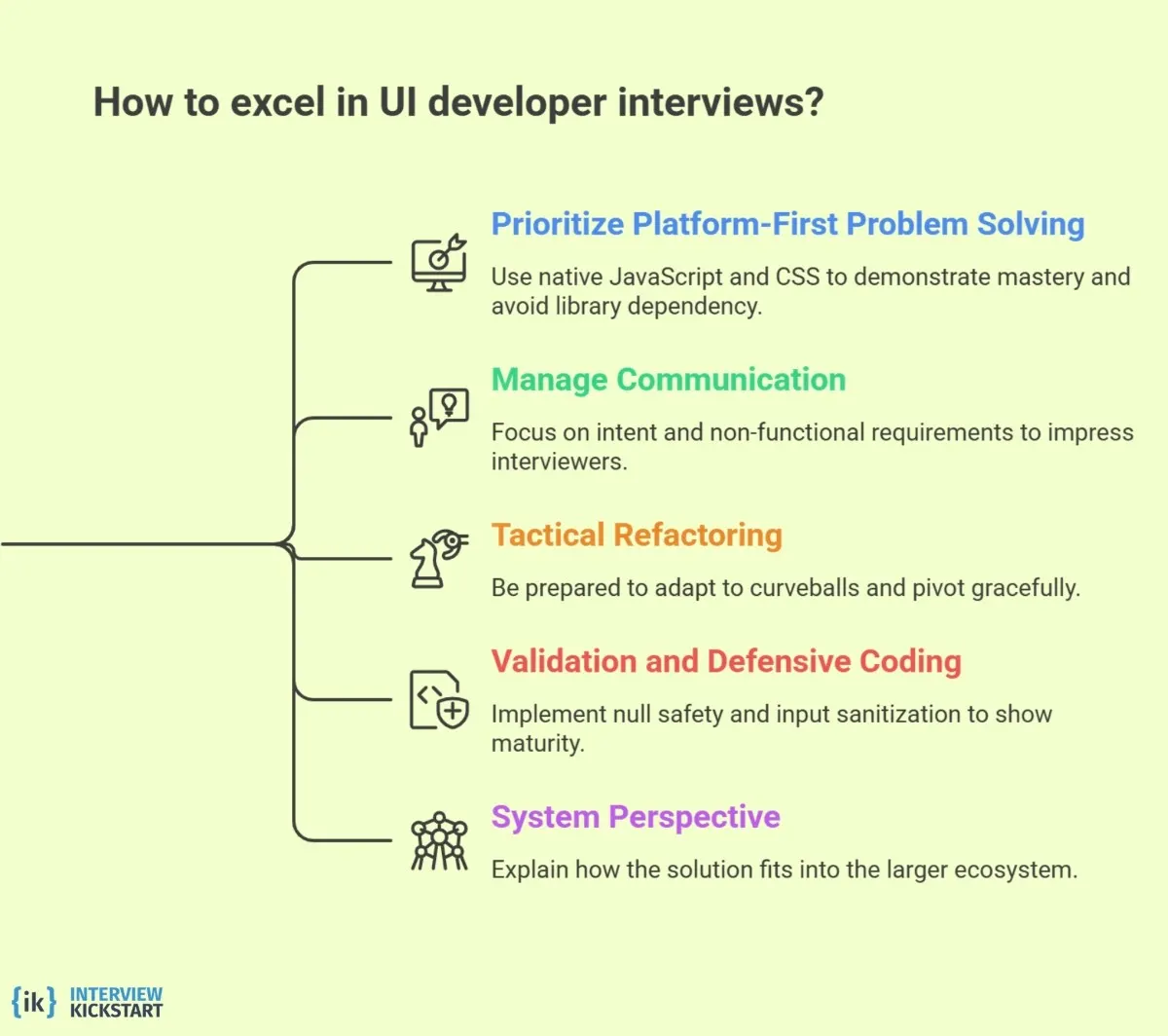
Execution is where most candidates stumble, even if they have spent weeks studying UI developer interview questions. It is one thing to know how a closure works in a vacuum; it is another to implement one while a senior engineer is scrutinizing your every keystroke.
To succeed, you need to move beyond theory and master the tactical nuances of the interview room.
1. Prioritize Platform-First Problem Solving
A common mistake is reaching for a library the second a challenge is presented. Interviewers at top-tier firms are looking for platform mastery.
- Avoid Library Dependency: If asked to manipulate a list or handle dates, try to use native JavaScript methods. It proves you aren’t reliant on third-party abstractions that bloat bundle sizes.
- Demonstrate CSS Capability: If a UI state can be handled with a CSS pseudo-class instead of a JavaScript state variable, use the CSS approach. It shows you understand performance and the rule of least power.
2. Manage the Signal-to-Noise Ratio in Your Communication
When answering interview questions for UI developer roles, your verbal explanation is just as important as the code you write.
- Avoid Narrating Syntax: Don’t say, Now I am writing a for-loop. They can see that. Instead, narrate the intent: “I’m iterating through this collection to normalize the data structure before it hits the component state.”
- Address the Non-Functional Requirements: Even if not asked, briefly mention how your solution impacts core web vitals. “I’m using a priority attribute on this hero image to ensure we don’t hurt our Largest Contentful Paint (LCP) score.”
3. Tactical Refactoring and The Pivot
In many interview questions and answers for UI developer assessments, the interviewer will intentionally give you a curveball halfway through.
- Don’t Get Defensive: If they ask you to change your architecture (e.g., “What if this were a multi-select instead of a single-select?”), Don’t try to hack your current code.
- Acknowledge the Trade-off: Say, “My current data structure is optimized for a single value; to support multi-select efficiently, I should pivot to a Set to keep lookups at $O(1)$ complexity.” This shows you can handle changing product requirements gracefully.
4. Validation and Defensive Coding
Senior-level execution involves assuming that things will go wrong.
- Null Safety: When accessing deeply nested objects in a coding challenge, use optional chaining (?.) or nullish coalescing (??).
- Input Sanitization: If the question involves a search bar or form, mention how you would prevent XSS or handle malicious user input. Even a 10-second mention shows a level of professional maturity that junior developers lack.
5. The System Perspective
When you finish a task, don’t just say ‘I’m done’. Briefly explain how this small widget fits into a larger ecosystem.
- The Logging Layer: “In a production environment, I would add error logging (like Sentry) here to catch any edge-case API failures.”
- The Testing Strategy: “I’ve structured this logic into a pure function so it’s easily unit-tested without needing to mount the entire UI.”
Also Read: Essential Front-End Interview Tips and Strategies
Prepare for UI Roles with the Front End Engineering Interview Masterclass
Preparing for UI roles today requires more than memorizing UI developer interview questions. Companies expect engineers who can build reliable components, reason about performance, and clearly explain their decisions during interviews. Many candidates understand the basics but struggle to demonstrate those skills during live coding and system design discussions.
The Front End Engineering Interview Masterclass from Interview Kickstart helps bridge that gap. The program focuses on the same areas that hiring teams evaluate when asking frontend interview questions and advanced UI engineering interview questions.
What will you practice in the program?
- Building reusable UI components using strong HTML, CSS, and JavaScript fundamentals.
- Practicing real UI developer interview questions in mock interview environments.
- Learning React architecture patterns used in modern applications.
- Improving performance optimization and accessibility techniques.
- Receiving feedback from engineers who interview candidates at top tech companies.
It is designed by experienced engineers who understand how modern frontend interview loops work. If you want structured preparation for frontend interviews, this masterclass is a strong place to start.
Conclusion
As you prepare your interview questions and answers for UI developer roles, remember that the most successful candidates are those who treat the process as a peer-to-peer collaboration. By focusing on semantic integrity, performance metrics, and inclusive design, you show a level of professional maturity that goes beyond just writing code.
Mastering these interview questions for UI developer positions requires a commitment to the vanilla web and a sharp eye for user experience. Use these strategies to walk into your next interview with the confidence of an engineer who builds for the future.
FAQs: UI Developer Interview Questions
Q1. How long should my portfolio projects be?
Keep 2 to 4 polished projects that show depth, not breadth. When preparing for UI developer interview questions, pick projects that show component design testing and performance work.
Q2. Should I emphasize design tools or just code?
Show both. For UI developer interview questions, hiring managers want to see code plus a basic design workflow that links to Figma or Sketch. This proves you can execute a design handoff.
Q3. Can I use a framework other than React in a live round?
Yes, but be explicit. For UI developer interview questions, say which framework you used and why, and be ready to map your solution to vanilla JS. That helps examiners compare your fundamentals.
Q4. How do take-home assignments affect my chances?
They matter a lot. A clean repo and clear README answer common UI developer interview questions about maintainability and testing. Always include a short changelog and how to run tests.
Q5. What is good pair programming etiquette in a UI interview?
Talk about your intent, ask small clarifying questions, and keep commits atomic while you code. These habits show you can handle UI developer interview questions under pressure and collaborate well.
References
- Job Growth for Web Developers and Digital Designers, says the U.S. Bureau of Labor Statistics.
- UI Developer Job Satisfaction (Sept 23 2025), from MeasuringU
Related Articles








